


ExpressJobs Job Search & Apply
3.5489.00 Reviews
App Specs
- Version
- 1.0.32.0
- Updated On
- License
- Free
- Downloads
- 100,000+
- Developer
- Express Services, Inc
- Categories
- Business
- Platform
- Android
Screenshots



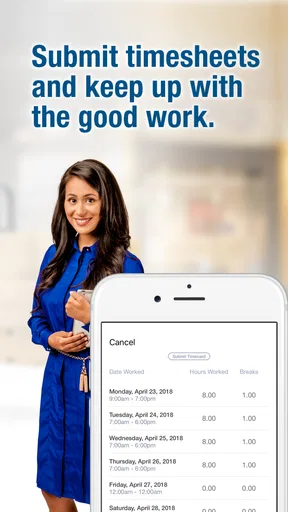

 Analysis by AppCompare
Finding work is rarely difficult because of one missing button. The real problem is the scattered routine around it: checking openings, remembering which roles looked promising, confirming a shift, and recording time after the work is done. ExpressJobs Job Search & Apply makes the most sense when I treat it as one working part of that routine rather than as a complete career-management system. It is a free Business app from Express Services, Inc that brings job searching, applications, schedules, and time entry into the same mobile experience.
That combination is useful for people whose relationship with work continues after the application stage. A job-search app can help me discover an opportunity, but an app that also shows my schedule and lets me enter time has a more practical role once I am already working. I found the strongest value in that continuity: fewer separate places to check and fewer moments where I have to reconstruct what happened during the week.
The app has a 3.5 average from around 1.3 thousand ratings and has passed 100 thousand installs. Those figures suggest a product with a meaningful user base, but also one that will not feel equally polished for everyone. I would approach it as a focused employment tool, not as a universal replacement for a general job board, calendar, notes app, or payroll system.
Building a work routine around ExpressJobs
I’d use this section to focus on making ExpressJobs part of a dependable weekly habit, rather than checking it only when something feels urgent. A useful next step is to choose a regular moment for reviewing work details, then decide which commitments also need to be shared through a personal calendar or household routine.
Start with a plan before opening the app
The most useful change I can make before using ExpressJobs is deciding what I am trying to accomplish in each session. Opening a job-search app without a plan often turns into endless browsing. I prefer to begin with a short target: look for suitable work, review an existing schedule, or enter time from a completed shift. That simple distinction keeps the app connected to a real task instead of making it another source of digital clutter.
For a job seeker, the first stage is deciding what “suitable” means. It might be a particular type of role, a workable location, a schedule that fits family responsibilities, or an opportunity that can begin soon. I would keep those priorities in mind while searching rather than applying to every result that appears. The app can support the search-and-apply part, but it cannot make the decision for me.
There is also a useful separation between discovery and follow-up. I can use a session to identify opportunities, then return later to complete applications when I have the information and concentration needed. That is better than rushing through forms on a phone simply because a listing caught my attention. The app becomes more effective when I use it as a controlled inbox for work possibilities, not as a place where every decision has to happen immediately.
Worth Reading Before You Choose

EA SPORTS FC Mobile 26 Is a Bigger Football Game, but It Takes Time

Flipboard Shows What News Apps Must Do Beyond the Feed

Switching to Android Auto Means Rethinking Your Driving Routine

Google Calendar Makes a Crowded Week Easier to Manage

Ludo King Makes the Most of the Minutes Between Plans

Baby Panda World Brings Quick Play to Modern Phones, but Its Game Library Feels Busy
For someone already placed in work, the starting question changes. Instead of asking what I should apply for, I ask what needs attention today. A quick schedule check before leaving home can prevent the common mistake of relying on memory. After a shift, entering time while the details are fresh is more dependable than waiting until the end of a busy week.
Using one place to capture opportunities and obligations
ExpressJobs is designed around several connected actions: searching for jobs, applying, viewing a work schedule, and entering time. I like that the workflow follows the way employment actually develops. A person may begin as an applicant, become a scheduled worker, and then need a simple way to keep work records current. Moving through those stages in one app is more coherent than using a job board for one step, messages for another, and a separate paper note for hours.
When I search, I would resist treating every result as equally valuable. A better approach is to read each opportunity with a short checklist in mind: does the role match my availability, can I realistically reach it, and am I prepared to apply now? This makes the application action more deliberate. It also reduces the risk of creating a long trail of half-finished applications that I later forget.
A practical capture habit is to apply soon after deciding that a role fits, while the reason for choosing it is still clear. If I postpone every promising opportunity, the search becomes difficult to manage. If I apply to everything instantly, I lose selectivity. The app is most helpful in the middle: use it to act on a small number of credible options and keep the rest of the search from becoming noise.
For scheduled workers, the schedule view can serve as the day’s reference point. I would check it at a consistent moment, such as the evening before work or at the beginning of the day, rather than only when I am already late or uncertain. That routine turns a passive feature into a useful planning checkpoint. It also gives me a chance to notice changes before they interfere with transportation, childcare, or other commitments.
A repeatable weekly rhythm is more valuable than constant checking
I do not think this app needs to be opened continuously to be useful. A sustainable rhythm is usually better. A job seeker might search during a focused block, review the results, and submit only the applications that meet the chosen criteria. A working user might check the schedule before the workday and enter time shortly after finishing. These small habits are easier to maintain than repeatedly opening the app without a clear purpose.
One routine I would recommend is a three-part cycle. First, search with a defined goal. Second, complete applications while the relevant details are available. Third, review the schedule and record time as part of the working week. The important point is that each visit has a job. That makes it easier to notice whether the app is helping or whether I am simply spending time inside it.
Time entry deserves particular discipline. I would not rely on a weekend memory exercise if I can enter the information closer to the shift. A quick check after work can catch mistakes while they are still easy to correct. If I am unable to enter time immediately, I would keep a temporary handwritten or personal note and transfer it later, rather than trusting vague recollection. That is not a feature claim about ExpressJobs; it is a sensible backup habit for any mobile timekeeping workflow.
The same principle applies to schedules. I would still keep major personal commitments in my normal calendar, because a work schedule and a personal calendar serve different purposes. ExpressJobs can be the authoritative place to check work details, while the calendar helps me see how those commitments fit with appointments and travel. Using both deliberately is less confusing than expecting one app to handle every planning need.
Notifications, when available through the device and app setup, should support the routine rather than replace it. I would still make a manual schedule check for important shifts. A reminder can be missed, delayed, or overlooked among other alerts. The strongest system combines a predictable check with a backup calendar or note for commitments that have serious consequences if forgotten.
Where the workflow can break down
The first friction point is that a mobile application cannot remove uncertainty from the employment process. A search result may look promising but still require careful reading and a realistic assessment of fit. Applying through the app does not guarantee a response, and the convenience of submitting an application can make it tempting to apply without preparing. I would use the app to make the action easier, not to lower my standards for choosing work.
The second issue is that a schedule screen is only useful when I check the current information and understand what it means. If my plans change, I should not assume that an old view remains accurate. I would make the app my first place to verify work details, but I would also follow any direct instructions from the employer or staffing contact. The app should support communication, not become an excuse to ignore it.
Time entry has its own risk. A convenient form can encourage quick submissions, but speed is not the same as accuracy. I would review the date, the shift context, and the hours before saving anything. If a correction is needed, I would handle it promptly instead of quietly keeping a private version that conflicts with the official record. This is one of the places where a minute of careful review can prevent a much longer conversation later.
There is also a device and compatibility consideration. ExpressJobs requires Android 6.0 or later, so it is accessible on many older Android devices, but anyone using an older phone should check compatibility before planning a work routine around it. The current version is 1.0.32.0, and keeping the app current is sensible for stability. On a phone with limited storage, battery, or unreliable connectivity, I would be especially cautious about leaving important tasks until the last minute.
Another limitation is scope. ExpressJobs is not the right single tool for building a detailed professional portfolio, tracking every application across unrelated employers, managing a long-term career plan, or replacing a full personal finance system. A general job board may offer broader discovery, while a spreadsheet or notes system may provide more flexible tracking. I would choose those alternatives when my main need is comparison, documentation, or long-term organization rather than the employment workflow this app targets.
Small habits that make the app more dependable
My first practical tip is to separate “interesting” from “ready to apply.” When browsing, I would pause before submitting and ask whether I have the information needed to complete the application accurately. This prevents a common mobile mistake: starting several applications during a spare moment and finishing them later without remembering which details belonged to which role.
My second tip is to use the schedule as a planning trigger, not just a lookup screen. After checking a shift, I would immediately consider travel time, clothing or equipment, and any personal obligation that could overlap. The app may show the work commitment, but the useful decision happens when I connect that commitment to the rest of my day.
My third tip is to make time entry part of the end-of-shift ritual. I would do it after putting away work items or before beginning the next personal task. Associating it with an existing habit makes it less likely that I will postpone it. If the shift was unusual, I would add a private note outside the app while the details are fresh, especially if I may need to explain a discrepancy later.
A fourth insight is to keep a lightweight external record of application follow-up. ExpressJobs can help me apply, but I would still note the role and the date in a personal system if I need to remember when to check for a response. This is not a criticism of the app so much as a recognition that job searching often stretches across several channels. A small record prevents the app from carrying responsibilities it was not designed to carry.
Finally, I would review the routine itself after a week. Did I miss a schedule check? Did I submit applications that did not fit? Did I delay time entry? The answers tell me whether the problem is the app, the timing of my sessions, or an unrealistic process. That kind of review turns ExpressJobs from a reactive tool into part of a more sustainable work system.
Who will benefit most from this approach?
I see the clearest fit for people who want job search and work administration close together. Someone moving from looking for work into an active assignment may appreciate not having to change tools completely. Workers who frequently need to check schedules or record hours can also benefit from having those tasks available on the phone they already carry.
It may be particularly helpful for people whose days are mobile and whose access to a desktop is limited. A phone-based workflow makes it possible to handle an application or check a schedule during a practical gap in the day. Still, I would not confuse convenience with comfort. Long forms, careful reading, and thoughtful application answers can be easier on a larger screen, so I would use a computer when the task demands more concentration.
The app is less suitable for someone who wants a broad, independent job-search database across many unrelated sources, or for a professional who needs advanced application analytics and detailed career management. In those cases, a general employment platform or a personal tracking system may be a better primary tool, with ExpressJobs used only when its schedule and time functions are relevant.
Families and caregivers should also think about how they will handle schedule changes. A work schedule inside the app can be checked quickly, but the rest of the household may depend on a shared calendar or message. I would copy important commitments into the system the family actually uses, while keeping ExpressJobs as the place to verify the employment details. That division reduces the chance that one person’s work information remains invisible to everyone else affected by it.
What to expect before adopting it
ExpressJobs is free and rated for Everyone, which makes it approachable for a wide range of users. It was released on March 7, 2018, and the developer is Express Services, Inc. In practical terms, I would judge it less by the age of the product and more by whether its current workflow matches my employment needs. The important question is not whether it has every possible job feature, but whether search, applications, schedule review, and time entry are the tasks I need to keep close at hand.
I would install it with a specific first-week test. Search for realistic opportunities, complete one carefully chosen application if appropriate, check how naturally the schedule fits into my day, and record time without postponing it. That experiment gives a better answer than browsing feature descriptions. If the app reduces the number of places I need to check, it is earning its place. If I still need several other tools for the same core tasks, I would keep it only for the functions it handles best.
My overall view is positive but practical. ExpressJobs is strongest as a focused bridge between looking for work and managing work already underway. Its value grows when I pair it with clear search criteria, regular schedule checks, accurate time entry, and a small backup system for follow-up. It is not a complete employment command center, and users who need broad job discovery or sophisticated tracking may prefer another primary option.
For the right person, though, the focused design is an advantage. I would recommend it to a friend who needs a straightforward mobile connection between opportunities, applications, shifts, and hours, especially if that friend is willing to build a routine around those actions. The best reason to use ExpressJobs is not that it promises to organize an entire working life; it is that it can make a few important employment tasks easier to repeat correctly.
Pros
- Searches jobs across multiple industries and experience levels.
- Simple filters help narrow results by location
- salary
- and job type.
- Job listings are easy to scan on a mobile screen.
- Useful alerts can notify you about newly posted opportunities.
- Supports faster applications by keeping the search process in one place.
Cons
- Some listings may redirect you to external sites to apply.
- Job quality and accuracy can vary between employers.
- Frequent notifications may feel excessive for casual job seekers.
- Competition can be high for popular positions.
- Some features may require account creation or personal details.
FAQs for ExpressJobs Job Search & Apply
What is ExpressJobs Job Search & Apply, and how does it work?
ExpressJobs Job Search & Apply is a mobile job-searching platform designed to help users discover employment opportunities from their phones. After creating a profile, you can browse available vacancies, filter results by location, job type, or keywords, review job descriptions, and submit applications where supported. The exact features may vary depending on your region and the employers listed on the service.
Do I need to create an account before applying for jobs?
An account is generally useful, and in some cases required, to save job listings, build a candidate profile, receive recommendations, and track applications. You may be able to browse vacancies without registering, but applying usually requires personal and professional information. Before submitting anything, review your profile carefully and make sure your contact details, work history, and uploaded résumé are accurate and up to date.
Can I apply for jobs directly through ExpressJobs Job Search & Apply?
The application process depends on the individual listing. Some vacancies may allow you to apply inside the app using your stored profile or résumé, while others may redirect you to an employer’s website or an external application page. Always check the destination before entering sensitive information, confirm that the employer appears legitimate, and avoid paying fees simply to submit a job application.
Is ExpressJobs Job Search & Apply free to download and use?
Job-search applications are commonly free to download, and basic features such as browsing vacancies and viewing job descriptions may not require payment. However, availability of premium tools, advertising, subscriptions, or region-specific charges can change over time. Check the Google Play Store or Apple App Store listing for the current pricing details, in-app purchase information, and subscription terms before downloading.
Is ExpressJobs Job Search & Apply safe for sharing personal information?
As with any employment platform, use caution when providing personal data. Share only information needed for a legitimate application, such as your résumé and professional contact details, and avoid sending passwords, banking credentials, identity documents, or payment information unless you have independently verified the employer and the application process. Review the app’s privacy policy, permissions, developer details, and user feedback before creating a profile.


